ListenHub vs. BibiGPT (2026): AI Audio Briefings or Fast Content Understanding — Which Should You Pick?
ListenHub vs. BibiGPT (2026): AI Audio Briefings or Fast Content Understanding — Which Should You Pick?
Quick answer: If you want to turn a document into easy-listening AI conversational audio and play it like a podcast on a walk, pick ListenHub. If your real daily headache is “too many videos and podcasts other people send that I can’t get through,” and you need to turn them into readable, searchable, ask-anything structured notes, pick BibiGPT. The former leans toward listening; the latter toward understanding and using. Six dimensions below make it clear.
1. First, They Don’t Solve the Same Thing
When people search for “ListenHub alternative” or “AI audio briefing tool,” what they really want to ask is the same question: I’ve bookmarked a pile of content — how do I digest it with the least effort?
But “digesting” has two completely different paths:
- Path A: turn content into pleasant audio you can listen to on the move — the direction of tools like ListenHub
- Path B: turn content into readable, searchable, askable notes so you understand it fast and put it to use — BibiGPT’s direction
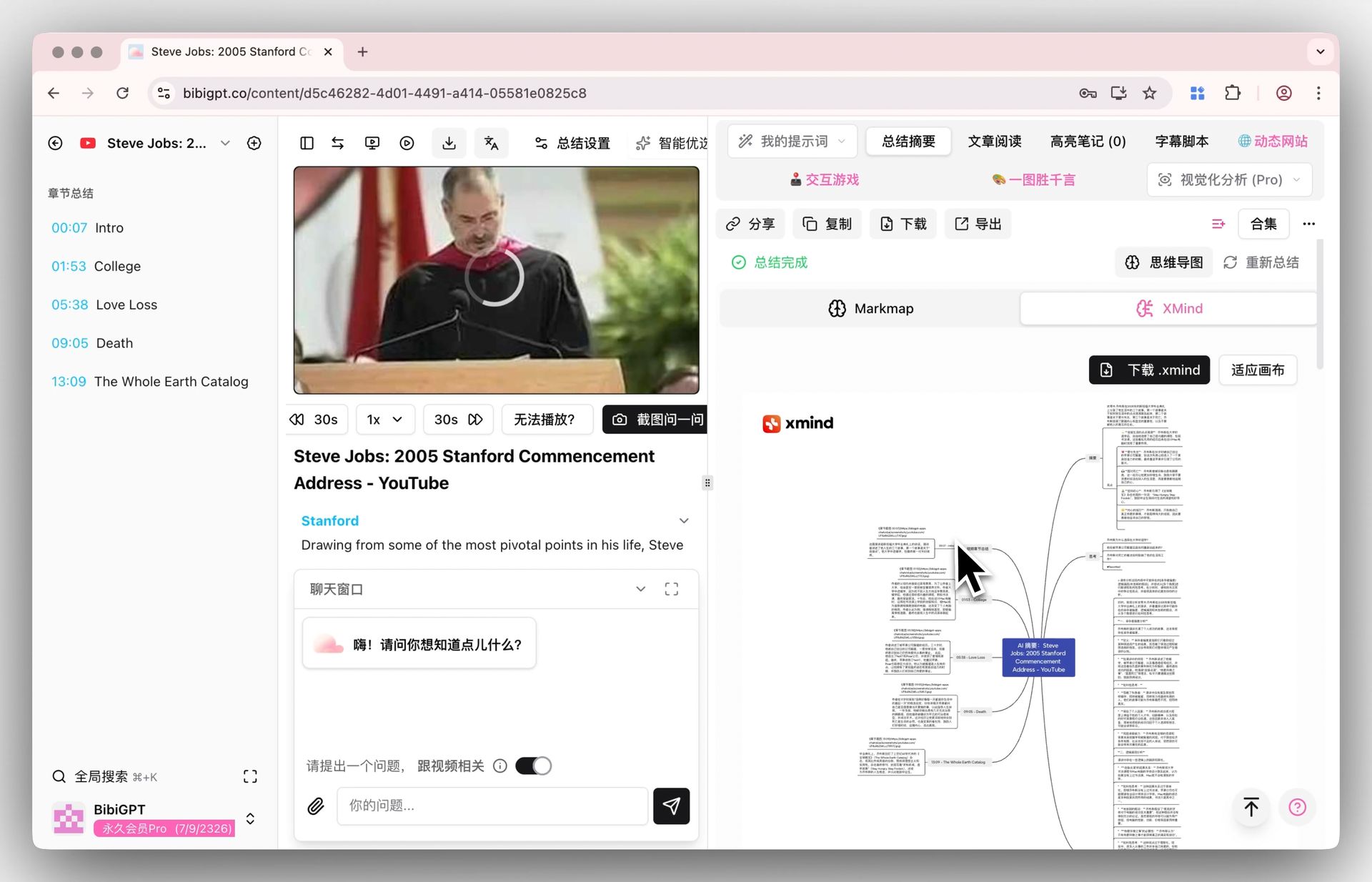
As shown below, BibiGPT breaks a video straight into a clickable mind map, so you instantly see what each section covers — the classic form of the “understand it” path:
Screenshot: BibiGPT · video mind map feature
Practical rule: Before picking a tool, ask yourself — do I ultimately want to “get the gist by ear” or “understand it and be able to use it”? That decides which path you should take.
2. What ListenHub Is Good For
ListenHub’s core ability is turning the materials you provide into AI conversational audio — two AI hosts in a back-and-forth, walking you through the content like a podcast made just for you.
Where it shines:
- Commuting, working out, doing chores — when you want to “run through” some material by ear
- You prefer conversational, easy information intake and don’t want to stare at text
- Turning a dry document into relatively entertaining audio
Its limit is also clear: audio is linear. You can’t jump quickly to “that key conclusion at minute 14,” and you can’t pause halfway to ask “what does this line mean?” To revisit a detail, you can only scrub the timeline and hunt for it.
3. What BibiGPT Is Good For
BibiGPT takes the other path — turning external audio and video into readable, searchable, ask-anything structured notes.
The demo below shows how BibiGPT processes a video link — paste it, get a structured summary in seconds:
Summarize any video in seconds
Pick a sample below to see the AI summary — TL;DR, key points, and jump-to timestamps.
TL;DR: Karpathy builds a GPT-style language model from scratch in code, explaining every piece — from a tiny character-level model up to the full Transformer.
Key points
- Start with a bigram model, then add self-attention so tokens can "talk" to each other
- A Transformer block = multi-head attention + feed-forward + residual connections + layer norm
- Training is just predicting the next token; scale and data do the rest
- The same architecture behind nanoGPT is what scales up to ChatGPT
Jump to
- 00:07 Why build GPT from scratch
- 08:23 Self-attention, intuitively
- 1:00:00 Assembling the Transformer block
- 1:35:00 From nanoGPT to ChatGPT
Where it shines:
- A coworker sends an hour-long meeting recording and you just want the conclusion
- You’ve bookmarked a pile of YouTube / Bilibili tutorials you’ll never finish
- You want to turn key points from a video into notes for the long term
- You hit a question halfway and want to ask the AI directly
The key part: BibiGPT’s summaries are not linear. Every point jumps back to the matching timestamp in the original video — go straight to the section you want, no scrubbing from the start.
4. Six-Dimension Comparison
This table puts both on the table and compares them item by item against real usage:
| Dimension | ListenHub | BibiGPT |
|---|---|---|
| Input source | Materials / documents you provide | External audio & video links (30+ platforms: Bilibili/YouTube/podcasts/TikTok, etc.) + local files |
| Output form | AI conversational audio (listen) | Text summary + mind map + ask-anything (read + search + ask) |
| Summary depth | Overview-style, good for “a run-through” | Structured deep summary — points + logic + detail |
| Timestamp jump | None, linear audio playback | Yes — click a point to jump back to that moment in the video |
| Notes-app sync | Mostly audio export | Auto-sync to Notion / Obsidian for the long term |
| Price barrier | Billed per audio generation | A free tier — paste a link and try it |
Practical rule: If your goal is “easy listening,” an audio briefing is enough; if your goal is “understand it + search it back + work from it,” you need structured notes, not a stretch of audio that’s gone the moment it finishes.
5. A Real Verdict: Which Should Learners Use?
Want to see it in action? The video below, from a learning angle, demonstrates how to break a long video into absorbable knowledge:
For students and professional learners, the real pain isn’t “the content isn’t pleasant enough to listen to” — it’s “I watched it but can’t remember, can’t find it again, can’t use it.” That’s exactly the value of structured notes. A typical BibiGPT learning flow:
- Paste the video / podcast link you want to learn from into BibiGPT
- Get a structured summary + mind map in seconds; scan the skeleton first, then decide what’s worth a closer look
- Ask follow-ups on concepts you don’t get; the AI explains grounded in the video
- Save the summaries you like straight into Obsidian / Notion to search back anytime
- When reviewing, skip rewatching the whole video — read the notes and click a timestamp to jump to the key part
The demo below is step 2 — “generate a mind map” — where the structure of a piece of content is clear at a glance:
Turn a video into a mind map
A linear talk becomes a structured tree. Drag to pan, click nodes to fold.
6. FAQ
Q: Can ListenHub and BibiGPT be used together? Yes. You can absolutely use ListenHub to turn a document into audio for the commute, and BibiGPT to turn videos you want to study deeply into searchable notes. The scenarios are complementary.
Q: Can BibiGPT generate audio too? BibiGPT’s core is “watch fast, search it, use it well,” primarily in text summaries, mind maps, and ask-anything notes — built for scenarios where you need to understand and use the content.
Q: Which platforms does BibiGPT support? Bilibili, YouTube, podcasts, TikTok, Xiaohongshu, and 30+ platforms, plus local audio and video files.
Q: Which is better for learning? If you want to “understand, remember, and search back anytime,” BibiGPT’s structured notes + timestamp jumps fit learning better; if you just want a relaxed overview by ear, an audio briefing is enough.
Q: Does BibiGPT have a free tier? Yes. Paste a link and experience the summary right away — no need to register and pay first.
7. Wrap-up: Don’t Agonize Over “Form” — Choose for Your “Goal”
ListenHub is a fine tool, and if you enjoy the ease of “turning material into a podcast to listen to,” it fits well. But if your real daily problem is “too many outside videos and podcasts — can’t get through them, can’t remember, can’t find them again,” then what you need is a video AI assistant that turns content into knowledge fast — watch fast, search it, use it well.
Grab a link to a video you’ve been meaning to watch and paste it into BibiGPT right now — in seconds, you’ll have a structured note you can search, ask, and save.
BibiGPT Team