Bilibili Subtitle Downloader

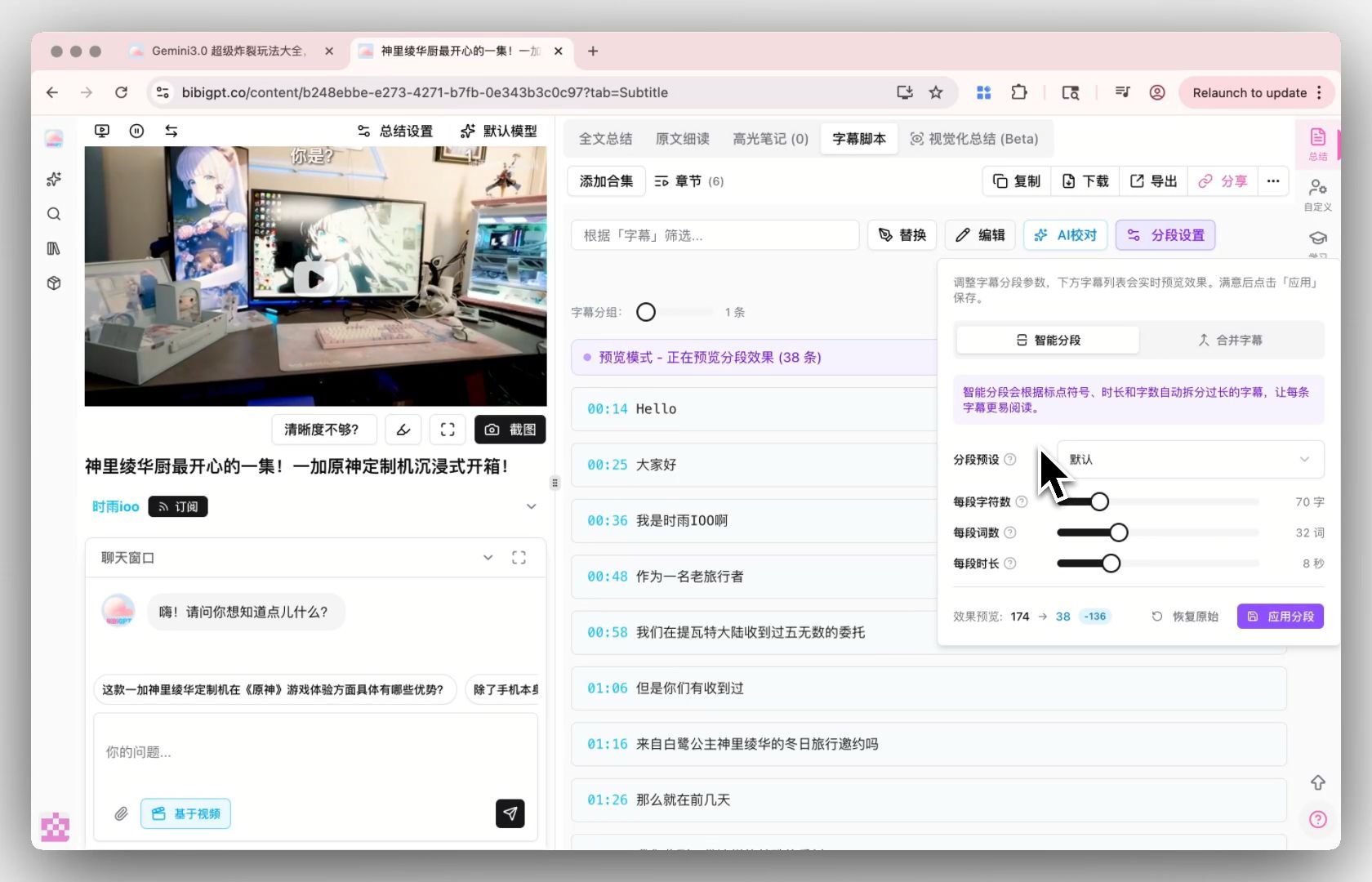
Export Bilibili CC subtitles as SRT, VTT, or TXT — timestamps kept, danmaku left out. Paste a bilibili.com link, a BV number, or a b23.tv share link; most Bilibili videos carry no CC track at all, so BibiGPT transcribes the Mandarin audio with AI when needed. Free, no login, no Bilibili account required.

SRT / VTT / TXT export Auto-transcribes captionless videos Free, no watermark

Download Bilibili subtitles right here

Paste a Bilibili URL — get SRT or VTT in seconds. The live BibiGPT app loads inline; no redirect, no tab switching.

The short answer

Paste a Bilibili link (bilibili.com URL, BV number, or b23.tv share link) into BibiGPT and export the subtitles as .srt, .vtt, or .txt with timestamps kept. If the video has an official CC track, it is extracted verbatim; since most Bilibili videos have no CC at all — danmaku comments are not subtitles — BibiGPT transcribes the spoken audio with AI and still returns a clean, timestamped file. No Bilibili login or 大会员 needed.

Features

A Bilibili subtitle downloader that never comes back empty

Most subtitle downloaders fail the moment a Bilibili video has no captions. BibiGPT auto-transcribes with AI when needed, so you always walk away with a clean SRT, VTT, or TXT file.

Captions when they exist, AI transcript when they don't

BibiGPT first pulls the creator-uploaded or Bilibili auto-captions verbatim. If the video has none, it transcribes the spoken audio with AI so you still get the full text.

Export to SRT, VTT, TXT, or Markdown

SRT and VTT keep timestamps so you can re-burn subtitles into an edit. TXT is plain copy-ready text. Markdown drops straight into Obsidian or Notion.

Works on long videos, mini-videos, and livestream replays

Paste a bilibili.com or b23.tv share link — both work out of the box. Same one-click flow, same export formats every time.

What you get on top of just the captions

If you only need raw captions, that's one click. If you want more, BibiGPT layers translation, summary, and AI dialog without leaving the page.

One-click translate to 5 languages

Once captions are extracted, translate to Chinese, English, Japanese, Korean, or Traditional Chinese — and download a bilingual SRT.

AI summary and mind map

Skip watching: get a structured summary plus visual mind map of the Bilibili content. Great for research and content briefs.

Free for daily use

Free users get 3 caption extractions per day. Plus ($19.8/mo) raises to 50/day, Pro ($34.8/mo) is unlimited with batch API.

3 steps to finish

No signup needed for the free tier. Use the embedded tool above — your URL is processed in seconds.

  1. 1

    Paste Bilibili URL

    Copy the share link from Bilibili — bilibili.com URLs, BV numbers, and b23.tv short links from the mobile app all work out of the box.

  2. 2

    Wait a few seconds

    If the video carries an official CC subtitle track, BibiGPT extracts it verbatim. If not — the common case on Bilibili — it transcribes the Mandarin (or other) audio via AI, typically 5-15 seconds for a short clip.

  3. 3

    Download or copy

    SRT (timestamps for re-burn), TXT (plain text), Markdown (Notion ready), or copy to clipboard. What you get is the spoken script — danmaku overlay comments are not mixed in.

BibiGPT vs yt-dlp vs NoteGPT vs DownSub for Bilibili

How the commonly cited subtitle tools actually behave on Bilibili links. Capabilities below reflect each tool's own documentation and issue tracker.

Capability BibiGPT yt-dlp NoteGPT DownSub
Bilibili link support bilibili.com / BV number / b23.tv, no login needed Supported via its Bilibili extractor; CC access can require passing browser cookies Bilibili summarizer accepts video URLs Not supported — Bilibili is not in its site list (YouTube, Viki, Viu…)
Videos without CC subtitles AI transcribes the audio automatically — works on the majority of Bilibili videos Nothing to download — it only fetches existing tracks, and often returns danmaku XML instead of captions Generates a transcript as part of its AI summary flow Nothing — needs an existing subtitle track
Timestamped subtitle file export SRT / VTT / TXT / Markdown Native subtitle formats when a real CC track exists Geared to notes — exports summaries/transcripts as PDF or Word, not SRT SRT / VTT / TXT (on supported sites only)
Danmaku vs subtitles Extracts the spoken script; danmaku is excluded Danmaku downloads as XML; turning it into ASS needs a plugin — and it's still comments, not a transcript Not a danmaku tool N/A
Setup None — paste a link in the browser Command line install + per-site flags and cookies Web tool, freemium quota Web tool with ads

3 typical scenarios

Built around what people actually do with Bilibili's Chinese-first catalog — study content, translation, and research.

Students — turn 知识区 lectures into searchable notes

Bilibili's knowledge zone is full of full-length courses and tech talks that never ship a CC track. Extract the transcript, export Markdown into Notion or Obsidian, and search the lecture instead of scrubbing through it.

Translators & overseas creators — re-subtitle Chinese videos

Pull the Mandarin script from a trending Bilibili video, get a timestamped SRT, and translate it for YouTube or other platforms. BibiGPT's one-click translation produces a bilingual SRT ready for re-burn.

Chinese learners — real spoken Mandarin with timestamps

Vlogs and interviews on Bilibili are natural listening material. Download the transcript, line it up against the audio by timestamp, and build Anki decks from real colloquial Mandarin instead of textbook dialogs.

References

Platform announcements and format standards this page relies on.

Loved by creators, students & researchers

Why people use BibiGPT to turn videos into text every day.

Trusted by 50,000+ users worldwide

★★★★★

“I paste a link and get clean captions in seconds — it saves me hours of retyping every single week.”

Maya R.

Content Creator · Repurposes short videos

★★★★★

“Exporting the transcript lets me review new words at my own pace instead of pausing the video constantly.”

Daniel K.

Language Learner · Studies with real videos

★★★★★

“Accurate, timestamped text I can quote directly. It has quietly become part of my daily workflow.”

Priya S.

Researcher · Cites public talks

Frequently Asked Questions

Ask us anything!

Popular guides

Download Bilibili subtitles free, right now

Paste a Bilibili link — get a clean SRT, VTT, or TXT file in seconds, timestamps included. Free, no login. AI auto-transcribes clips that have no captions.