Douyin Subtitle Downloader
Douyin videos don't carry a downloadable caption track — the captions you see are burned into the frame. BibiGPT solves it the only reliable way: AI transcribes the spoken audio and hands you a clean SRT, VTT, or TXT with timestamps. Paste any share link from the Douyin app; free, no signup, no watermark.
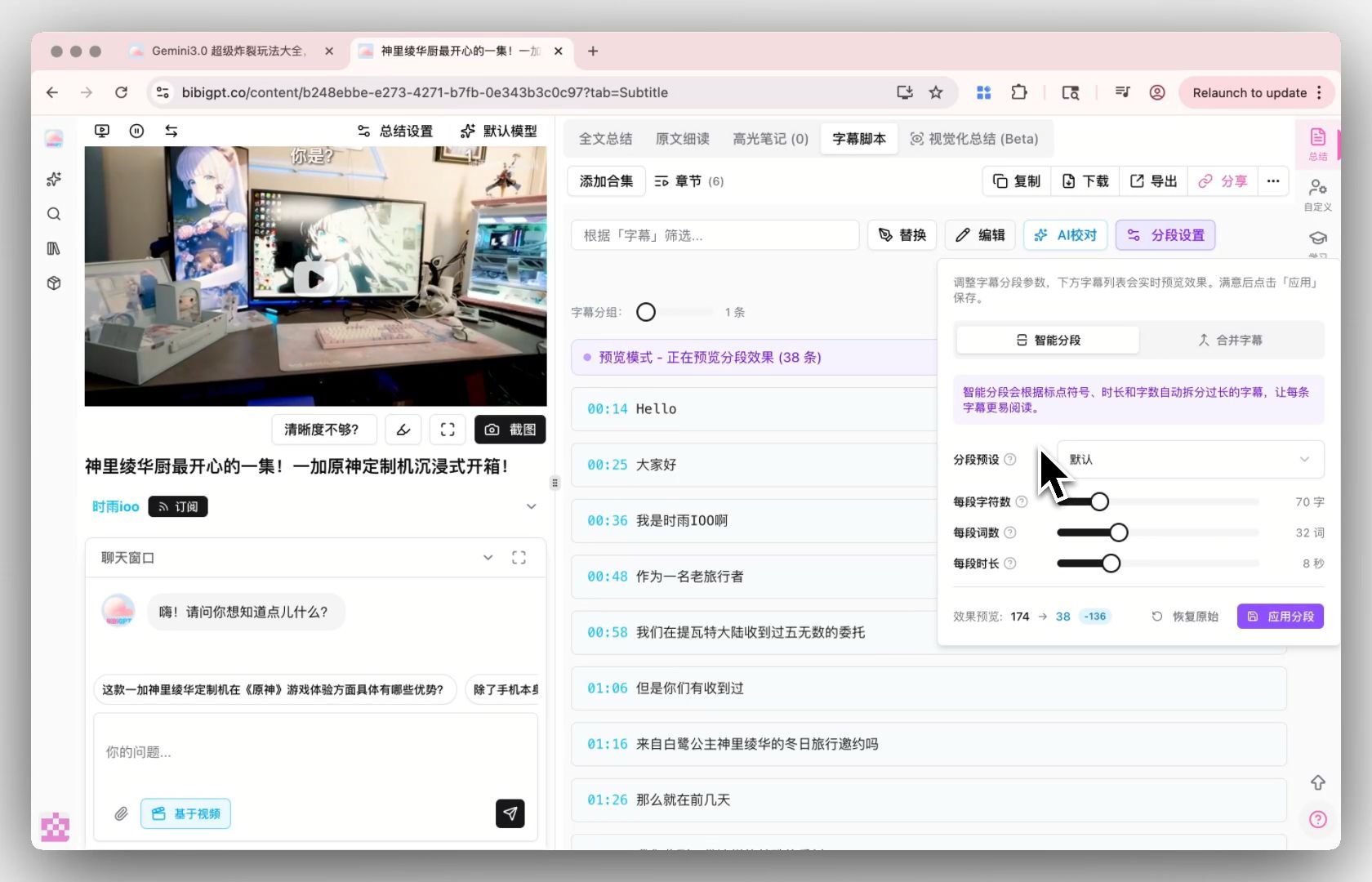
Download Douyin subtitles right here
Paste a Douyin URL — get SRT or VTT in seconds. The live BibiGPT app loads inline; no redirect, no tab switching.
The short answer
Paste a Douyin share link into BibiGPT and export the video's spoken script as .srt, .vtt, or .txt with timestamps. Douyin is different from YouTube: clips almost never ship a separate closed-caption track — on-screen captions are burned into the picture — so 'downloading subtitles' really means transcribing the audio, which BibiGPT's AI does automatically in seconds. Classic caption downloaders that only fetch existing tracks return nothing on Douyin.
Features
Why this beats DownSub or browser extensions
Most caption downloaders fail when the video has no native captions. BibiGPT auto-transcribes via AI when needed, so you always get text — for any Douyin video.
Captions when they exist, AI transcript when they don't
BibiGPT first tries to extract creator-uploaded or Douyin auto-captions. If the video has none, it transcribes the audio with AI — typically 5-15 seconds for a short clip.
SRT + TXT + Markdown export
SRT preserves timestamps so you can burn the subtitles back into a re-edit. TXT is plain text for paste-ready notes. Markdown is Obsidian / Notion friendly.
Works across short clips, longer videos, and live replays
iesdouyin.com / iesiesdouyin.com URLs both work. Same flow, same export formats.
What you get on top of just the captions
If you only need raw captions, that's one click. If you want more, BibiGPT layers translation, summary, and AI dialog without leaving the page.
One-click translate to 5 languages
Once captions are extracted, translate to Chinese, English, Japanese, Korean, or Traditional Chinese — and download a bilingual SRT.
AI summary and mind map
Skip watching: get a structured summary plus visual mind map of the Douyin content. Great for research and content briefs.
Free for daily use
Free users get 3 caption extractions per day. Plus ($19.8/mo) raises to 50/day, Pro ($34.8/mo) is unlimited with batch API.
3 steps to finish
No signup needed for the free tier. Use the embedded tool above — your URL is processed in seconds.
- 1
Paste Douyin share link
In the Douyin app tap Share → 复制链接 (copy link). The short v.douyin.com share URL and douyin.com web links both work out of the box.
- 2
AI transcribes the audio
Since Douyin clips don't carry a caption track, BibiGPT transcribes the spoken audio with AI — typically 5-15 seconds for a short video, with solid handling of fast, colloquial speech.
- 3
Download or copy
SRT (timestamps for re-burn or re-editing), TXT (plain script for copywriting), Markdown (Notion ready), or copy to clipboard.
BibiGPT vs DownSub vs yt-dlp vs NoteGPT for Douyin
Why generic subtitle downloaders come back empty on Douyin, dimension by dimension. Capabilities below reflect each tool's own documentation.
| Capability | BibiGPT | DownSub | yt-dlp | NoteGPT |
|---|---|---|---|---|
| Douyin link support | v.douyin.com share links and douyin.com URLs, straight from the app | Not supported — Douyin is not in its site list (YouTube, Viki, Viu…) | Has a Douyin extractor for the video file itself | Douyin not among its core supported platforms |
| Clips with no caption track (the Douyin norm) | AI transcribes the audio automatically | Nothing to download — it only fetches existing subtitle tracks | Nothing — it can save the video, but there's no subtitle track to extract and it doesn't transcribe | Transcribes as part of its AI summary flow on platforms it supports |
| Burned-in on-screen captions | Bypassed entirely — the transcript comes from the audio, so you get clean text without cropping or OCR | N/A | Stay baked into the downloaded video frames | N/A |
| Export formats | SRT / VTT / TXT / Markdown + copy | SRT / VTT / TXT (on supported sites only) | Video/audio files; subtitle flags do nothing here | Notes and summaries, PDF / Word oriented |
| Setup | None — paste a link in the browser | Web tool with ads | Command line install + flags | Web tool, freemium quota |
3 typical scenarios
Built around short-video workflows — script mining, content ops, and cross-platform repurposing.
Short-video creators — mine viral scripts
Grab the exact spoken script of a trending Douyin clip in seconds: the hook, the pacing, the CTA. Study 20 competitor scripts in the time it used to take to hand-transcribe one, then write your own variant.
Content ops & MCN teams — log accounts at scale
Turn a batch of Douyin share links into text you can archive, search, and review. Timestamped SRT makes it easy to reference the second a claim or product mention happens — useful for compliance checks and competitor tracking.
Marketers — turn spoken content into copy
A good 60-second Douyin pitch is ready-made ad copy. Export the TXT script, hand it to your copywriter or feed it into your content pipeline, and repurpose it for 小红书 posts, WeChat articles, or product pages.
References
Format standards and tool documentation this page relies on.
-
SRT (SubRip) files are numbered cues with start/end timestamps followed by the subtitle text — the structure BibiGPT produces from Douyin audio.
Matroska.org — Subtitle format specifications ↗ -
WebVTT (.vtt) is the W3C standard for timed text tracks on the web — use it when your player or platform expects web-native captions.
W3C — WebVTT: The Web Video Text Tracks Format ↗ -
DownSub's supported-site list (YouTube, Viki, Viu, Kocowa, WeTV…) does not include Douyin — existing-track downloaders have nothing to fetch there.
DownSub — supported sites ↗
Loved by creators, students & researchers
Why people use BibiGPT to turn videos into text every day.
Trusted by 50,000+ users worldwide
“I paste a link and get clean captions in seconds — it saves me hours of retyping every single week.”
Maya R.
Content Creator · Repurposes short videos
“Exporting the transcript lets me review new words at my own pace instead of pausing the video constantly.”
Daniel K.
Language Learner · Studies with real videos
“Accurate, timestamped text I can quote directly. It has quietly become part of my daily workflow.”
Priya S.
Researcher · Cites public talks
FAQ'S
Frequently Asked Questions
Ask us anything!
Popular guides
1 Bilibili AI Video Summary Tool: BibiGPT Summarizes 30+ Platforms Instantly (2026)
Best Bilibili AI video summary tool 2026? Paste a link for summary, mind map, and highlights on 30+ platforms — free tier to start.
2 Bilibili Transcript Tools Compared: Best Subtitle Extractors in 2026
Looking for the best bilibili transcript tool? We compare 5 top subtitle extractors for Bilibili videos — from free downloaders to AI-powered tools like BibiGPT that handle transcription, translation, and summarization.
3 OpenClaw + BibiGPT Skill 2026: AI Video Summary for Bilibili, Xiaohongshu & 30+ Platforms
OpenClaw can't summarize Bilibili/Douyin alone. Install bibigpt-skill once and summarize 30+ video platforms inside Claude Code — free to try.
Download Douyin subtitles right now
Paste a Douyin URL — get SRT, VTT, or plain text in seconds. Free, no signup. Auto-transcribes silent clips and slang-heavy speech with AI.