Douyin Video Summarizer: Top 3 AI Tools Compared (2026)

A free Douyin video summarizer should accept a public douyin.com / v.douyin.com link, return timestamped chapters, and let you jump back to the original clip — without downloading the file. In our 2026 retest, BibiGPT’s Douyin video to text is the paste-link workflow that also exports a mind map and notes; Doubao is fastest inside ByteDance’s own apps; VideoseekAI is a light preview with weaker export.
📌 Skip the roundup. Paste a Douyin link into BibiGPT Douyin video to text and read chapters plus a mind map in about 30 seconds — first run needs no signup.
Summarize any video in seconds
Pick a sample below to see the AI summary — TL;DR, key points, and jump-to timestamps.
TL;DR: Karpathy builds a GPT-style language model from scratch in code, explaining every piece — from a tiny character-level model up to the full Transformer.
Key points
- Start with a bigram model, then add self-attention so tokens can "talk" to each other
- A Transformer block = multi-head attention + feed-forward + residual connections + layer norm
- Training is just predicting the next token; scale and data do the rest
- The same architecture behind nanoGPT is what scales up to ChatGPT
Jump to
- 00:07 Why build GPT from scratch
- 08:23 Self-attention, intuitively
- 1:00:00 Assembling the Transformer block
- 1:35:00 From nanoGPT to ChatGPT
How do you summarize a Douyin video without downloading it?
Paste the public Douyin URL into a tool that accepts douyin.com or v.douyin.com, wait for chapters and timestamps, then jump back to the original clip when you need the exact line. You do not save the MP4 first.
That is the whole job. Creators, operators, and learners all fail the same way: they treat Douyin as a feed, then cannot find the sentence they remember. A summary is a map, not a replacement for the video.
Practical rule: If the tool cannot jump you to a timestamp, it is a recap, not a Douyin video summarizer.
Nomura, citing QuestMobile via TechNode (September 2026), put Douyin at about 714 million daily users in July 2026, with 112–120 minutes per user per day — more time than WeChat even though WeChat still leads on user count (931 million DAU). More minutes in the feed is more material you will never find again unless the clip becomes searchable text.
On our own Google Search Console corpus (200+ BibiGPT articles, mid-2026), how-to titles earned about 6.5% CTR at average position 6, while listicle titles sat at 0.96% CTR even at a better average position 4.9. That is why this page now leads with the paste-link workflow instead of another “top 3” promise.
The 30-second paste-link path
- Copy a public Douyin share URL (
douyin.comorv.douyin.com). - Open Douyin video to text and paste it.
- Read the chapter list, then click a timestamp to jump back into the clip.
- Export the mind map or Markdown if you want the clip in Notion or Obsidian.
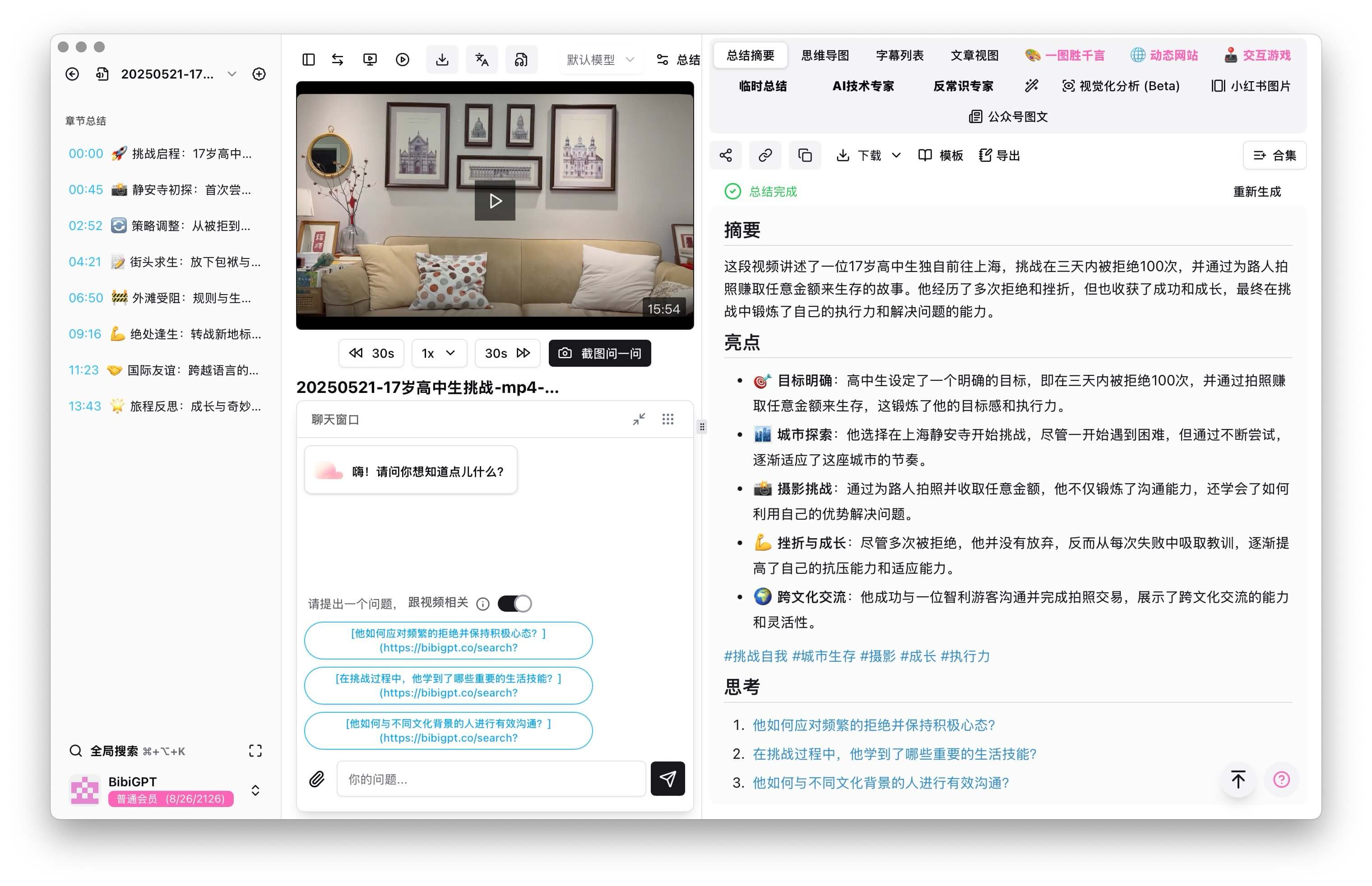
The screenshot below is the same paste box after a Douyin URL lands — chapters on the left, jumpable timestamps, mind map on the right.
Paste a Douyin link into BibiGPT Douyin video to text. You get structured chapters instead of a three-line recap.
Private, region-locked, or caption-disabled clips can still fail. When the public URL is blocked, download is a last resort — see Handle temporarily unsupported media — then upload the file. Do not start there.
What must a Douyin video summarizer actually do?
A Douyin video summarizer has to clear three gates: it accepts Douyin short links, it returns an outline with timestamps, and it exports somewhere you already take notes. Miss any gate and it stays a toy.
Douyin is not TikTok. The apps do not share accounts, catalogs, or share URLs. A YouTube-only summarizer that “also does short video” often rejects v.douyin.com. If you work both apps, use a paste box that covers Douyin and TikTok together — the TikTok and Douyin summarizer comparison maps that overlap.
The three user jobs are different, but they share the same capture step:
- Creators reverse-engineer hooks and talking points. They need structure, not a vibe sentence.
- Operators batch competitor and influencer clips. They need export, not another clipboard.
- Learners turn a three-minute explainer into a note they can search next month.
Practical rule: Judge the tool on link coverage, timestamped outline, and export. Speed is a bonus after those three.
Which Douyin summary tools did we retest in 2026?
We retested three tools that actually accept Douyin links: BibiGPT, Doubao, and VideoseekAI. BibiGPT is the knowledge workflow; Doubao is ByteDance’s built-in speed option; VideoseekAI is a light, caption-dependent preview.
We did not score generic chatbots. A raw assistant can rewrite a transcript you already have. It will not fetch a Douyin URL, split chapters, or sync Notion for you.
Feature comparison at a glance
| Feature | BibiGPT | Doubao | VideoseekAI |
|---|---|---|---|
| Douyin link | douyin.com / v.douyin.com, plus Bilibili, YouTube, podcasts, local files | Native Douyin clips inside ByteDance apps | Douyin, YouTube, Bilibili (partial) |
| Output | Chapters, timestamps, keywords, Douyin to mind map | Short bullet recap | Timestamped bullets |
| Visual analysis | Key frames and on-screen text | No | No |
| Export | Notion, Obsidian, Feishu, Markdown | Copy to clipboard | Download text |
| Reliability on longer clips | Stable in our 30+ minute tests | Occasional misses on older or caption-off clips | Depends on caption quality |
BibiGPT: paste the link, keep the map
This is the BibiGPT result view for a Douyin URL: structured chapters first, then a mind map you can save instead of a three-line recap.
BibiGPT Douyin video to text — chapters and a mind map from a public Douyin URL.
BibiGPT is built as an audio/video knowledge workflow, not a three-line recap. Paste a Douyin URL into Douyin video to text and you get chapters, timestamps, and a mind map you can save.
What we keep using it for:
- Structured summaries of long or multi-speaker clips, not only 15-second hooks.
- Knowledge views: mind maps, quote highlights, and topic clusters.
- Export into Notion, Obsidian, Feishu, Slack, or Markdown.
- Visual pass: on-screen text and layout, not only the audio track.
- Custom prompts when you need a study guide or a briefing instead of a generic recap.
Practical rule: AI summary is not “save two hours this once.” It is the map you use the next ten times you search “where did they say X.”
Try it on a live Douyin URL: Douyin AI summary — free first run.
Doubao: fastest inside ByteDance, thinnest export
Doubao is ByteDance’s assistant. For Douyin-native clips it is the speed pick: paste or open the video, grab a short recap, move on.
What stood out:
- Fast bullets when the clip is already in the Douyin/ByteDance world.
- Almost no setup.
- Weak export. You copy text by hand.
- Older videos and caption-off clips failed more often in our tests.
- Nuance is thin. Fine for “what is this 20-second clip,” not for a course module.
Use Doubao when you already live in Douyin and only need a glance. Switch out when the clip has to enter a notes system.
VideoseekAI: a preview, not a second brain
VideoseekAI’s UI is a timestamped skim of a public URL. The screenshot is that preview — not a notes workspace.
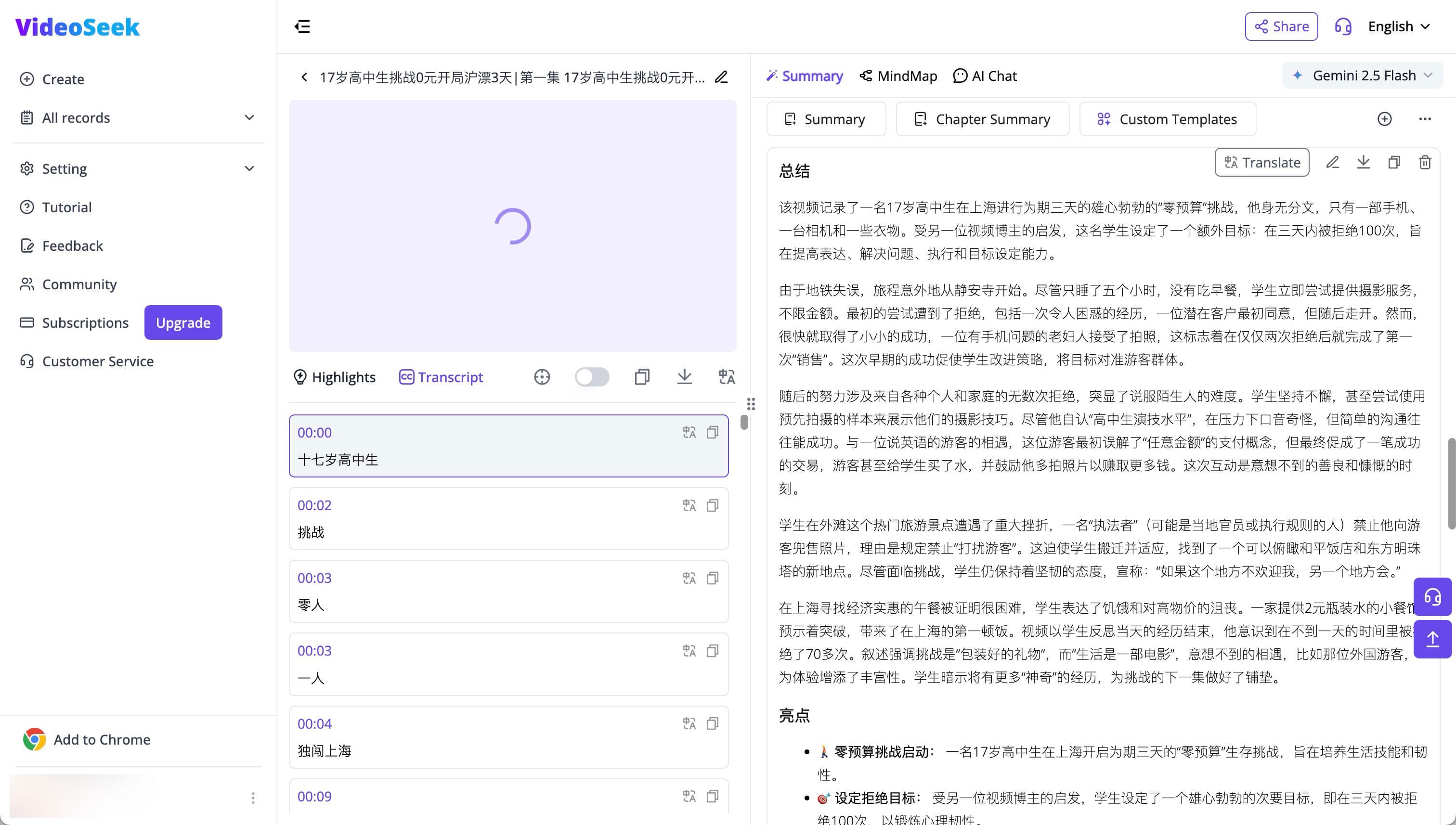
VideoSeek is useful for a timestamped skim. It is not a notes workflow.
VideoseekAI is a lightweight preview: clean UI, timestamped bullets, a browser extension. Accuracy tracks caption quality. Noisy audio or missing captions produce a weak outline. Export stays at “download text.”
Keep it for skimming a pile of public URLs. Do not build a knowledge base on it.
Who should pick which Douyin summarizer?
Pick Doubao for speed inside Douyin, VideoseekAI for a free skim, and BibiGPT when the clip has to become a searchable note with timestamps and export.
The decision tree:
- Need a 10-second recap inside Douyin? Doubao.
- Need a casual skim of public URLs? VideoseekAI’s free tier.
- Need chapters, a mind map, and Notion/Obsidian? BibiGPT Douyin video to text.
Professionals lose time on the last mile — capture → outline → export → search later. BibiGPT is the only one of the three that completes that loop on a Douyin URL without a manual paste chain.
Limitations to say out loud: BibiGPT still depends on a reachable public URL (or an uploaded file). Doubao’s native speed does not travel with you to YouTube or a local recording. VideoseekAI will look fine in a demo and then fold on a caption-less clip.
FAQ
Are these Douyin summarizers free?
All three have a free path. BibiGPT lets you try without signup on the first run, then uses a subscription with included minutes. Doubao is free inside ByteDance apps for now. VideoseekAI uses credits plus a signup bonus. If you summarize weekly, price the export step, not the first recap.
Will summarizing Douyin videos cause copyright issues or account bans?
Use summaries for personal study and internal reference. These tools analyze a public URL; they do not republish the video file. Do not redistribute the original clip. Fair-use comfort is higher for notes than for republishing someone else’s footage.
How is this different from asking a general chatbot?
A chatbot rewrites text you already have. A Douyin video summarizer has to fetch the URL, recover speech and on-screen text, chunk chapters, and export. The bottleneck is the input layer — getting the clip in — not the model name on the recap.
Do I need a different tool for TikTok?
Yes, if the tool only accepts douyin.com. BibiGPT covers Douyin and TikTok from one paste box. See the TikTok and Douyin summarizer comparison if you post on both.
What if the Douyin video is not supported?
Follow Handle temporarily unsupported media: get a local copy with a third-party downloader, then upload the file. Start with the public URL; download is the fallback.
Can I search Douyin clips from inside BibiGPT?
Pro members can switch the Explore search tab to Douyin and pick a clip to summarize, instead of hunting the share URL on the phone first. Paste-link still works for everyone on Douyin video to text.
Conclusion: turn the Douyin feed into a search box
Douyin now takes more minutes per day than WeChat for a typical user, with hundreds of millions of daily opens. The scarce skill is not watching more. It is retrieving the line you need next week.
Paste one public Douyin URL into BibiGPT Douyin video to text. If the outline and timestamps are useful, keep the clip in your notes. If you only needed a glance, Doubao is still there.
How many hours could you save?
Drag the sliders. Watching in full vs. skimming an AI summary — see the gap.
Paste a Douyin link into Douyin video to text. First summary is free, no signup.
Next steps:
- 🌐 Try it: https://bibigpt.co/en/desktop?utm_source=growth-pages&utm_medium=blog-inline-cta&utm_campaign=best-douyin-video-summary-tools-ai-analysis
- 📱 iOS: search Bibi记笔记 or BibiGPT on the China App Store
- ✨ Douyin video to text: https://bibigpt.co/en/features/douyin-video-to-text
Related reading:
Popular tools
More in this series
- AI Competitive Intelligence Workflow: Build Industry Monitoring with BibiGPT Video Summaries
- Lessons From Shipping BiliGPT: Two Cold-Start Growth Tactics Behind a GPT-3 Side Project
- [BibiGPT Growth Series] Episode 1 | How AI Summaries for Bilibili Were Born
- BibiGPT Advanced Guide 2026: Download + AI-Summarize Videos from WeChat Channels, RedNote, TikTok, and Enterprise Intranet Sites
- Chat with Any Video: How to Ask AI Questions About Videos Instead of Watching the Whole Thing (2026)