
Turn Long Videos and Podcasts into Structured Reading Notes: An AI-Era Knowledge Method (2026 PKM Playbook)
Turn Long Videos and Podcasts into Structured Reading Notes: An AI-Era Knowledge Method
Quick answer: Turning videos and podcasts into usable knowledge takes three steps — first, use AI to compress the content into a structured summary (get the skeleton); second, break the core ideas into individual “atomic notes” (one note, one idea); third, wire those notes into a knowledge base with backlinks (Notion / Obsidian). BibiGPT handles the parsing in steps one and two; your notes app handles long-term storage. Three months in, you’ll have a searchable, ask-anything personal knowledge network.
1. Why “Watched” Doesn’t Equal “Learned”
We consume mountains of video and podcasts every day, yet almost none of it sticks. The reason isn’t bad content — it’s a broken consumption method:
- It feels brilliant while you watch, then evaporates the moment you close it
- You want to cite a point but can’t recall which video, which minute
- You take heaps of notes, scattered everywhere, unfindable when you need them
- You watch five videos on one topic, but the knowledge never connects into a web
Practical rule: The essence of knowledge management isn’t “remembering a lot” — it’s “finding it back and using it when you need it.” A note that can be searched and reused is the only note worth having.
To fix this you need a complete workflow from consumption to retention, not the scattered habit of “screenshotting whatever looks good.”
2. Step One: Use AI to Compress Content into a Structured Summary
The first step of reading notes isn’t “transcribe everything” — it’s “build the skeleton first.” A two-hour podcast has tens of thousands of words in its transcript, but its real skeleton might be a dozen key points.
AI handles this step most efficiently. The demo below shows turning a video / podcast link into a structured summary:
Summarize any video in seconds
Pick a sample below to see the AI summary — TL;DR, key points, and jump-to timestamps.
TL;DR: Karpathy builds a GPT-style language model from scratch in code, explaining every piece — from a tiny character-level model up to the full Transformer.
Key points
- Start with a bigram model, then add self-attention so tokens can "talk" to each other
- A Transformer block = multi-head attention + feed-forward + residual connections + layer norm
- Training is just predicting the next token; scale and data do the rest
- The same architecture behind nanoGPT is what scales up to ChatGPT
Jump to
- 00:07 Why build GPT from scratch
- 08:23 Self-attention, intuitively
- 1:00:00 Assembling the Transformer block
- 1:35:00 From nanoGPT to ChatGPT
How to do it:
- Paste the video or podcast link into BibiGPT and get a structured deep summary in seconds
- The summary comes with logical hierarchy — theme, sub-arguments, key conclusions at a glance
- Pair it with a mind map — see the overall flow first, then decide which parts deserve a deeper dig
As shown below, BibiGPT breaks the content straight into a clickable mind map, with each branch’s topic crystal clear:
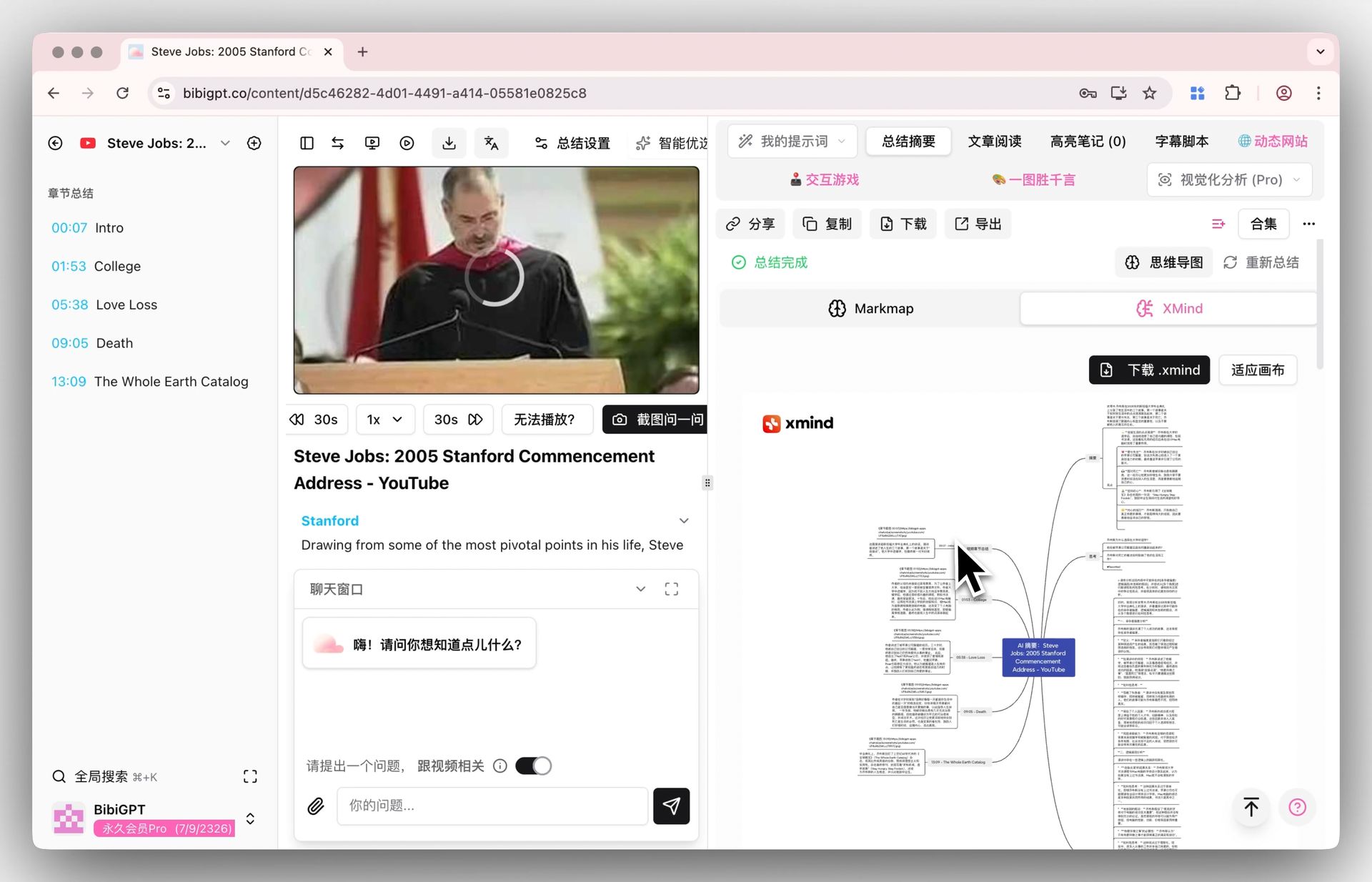
Screenshot: BibiGPT · video mind map feature
Practical rule: Skeleton before flesh. Never start note-taking from “transcribing word for word” — that’s copying, not learning. Let AI hand you a map first, then decide where to go.
3. Step Two: Break Ideas into “Atomic Notes”
With a skeleton, the next step is breaking core ideas into individual atomic notes — the heart of the Zettelkasten method:
- One note, one idea: “Compounding is fundamentally a friend of time” is one note; don’t mix it with “how to pick a fund”
- Rewrite in your own words: don’t copy the original — restate it in your own understanding. This step is where real learning happens
- Mark the source: note which video and which timestamp each note came from, so you can trace it back
This looks tedious, but AI already built the skeleton for you — you just pick the ideas that genuinely struck you from the summary and rewrite them one by one. For anything you didn’t fully grasp, ask the AI directly and have it explained grounded in the video.
Practical rule: The value of atomic notes is that they “recombine.” One idea per note means that when you write an article or prepare a talk later, these notes snap together like Lego — instead of rereading whole old notes from the top.
4. Step Three: Wire Them into a Knowledge Base with Backlinks
A lone note is an island; connection is what turns them into a knowledge network. This is where Obsidian / Notion shine — backlinks.
It’s simple:
- In the BibiGPT desktop app, turn on “auto-save to Obsidian / Notion after a summary completes”
- Every time you finish a video, the structured note files itself automatically
- In your notes app, create backlinks between related concepts (e.g., “compounding” links to “long-termism”)
- Over time, multiple video notes on the same topic naturally weave into a web
The video below, from a knowledge-management angle, demonstrates the full idea of “breaking down, connecting, and reusing long content”:
When you want to research a topic, you don’t rewatch five videos — you search a keyword in your knowledge base, and all the related notes and their connections surface at once. The demo below is what “generate a mind map from a piece of content, see its structure” looks like:
Turn a video into a mind map
A linear talk becomes a structured tree. Drag to pan, click nodes to fold.
5. A Complete Flow You Can Copy Today
Stringing the three steps together, here’s a workflow you can use today:
- Capture: hit a video / podcast worth learning — paste the link into BibiGPT
- Deconstruct: get a structured summary + mind map in seconds; read the skeleton first
- Distill: pick the 3-5 genuinely valuable ideas from the summary and rewrite them as atomic notes
- Ask: anything unclear — ask the AI directly to fill the gaps
- File: the notes you like auto-sync into Obsidian / Notion
- Connect: create backlinks between related concepts in your knowledge base
- Reuse: when needed, search a keyword — related notes + timestamps surface at once; click to jump back into the video and verify
Practical rule: The key to the whole flow isn’t “note more” — it’s “note more structurally.” AI breaks the content apart (less effort), you reorganize it into your own system (learning), and your notes app keeps it permanently searchable (retention).
6. FAQ
Q: Who is this method for? Anyone who needs to learn systematically from videos / podcasts — students, professional learners, content creators, and researchers.
Q: Do I have to use Obsidian? No. Notion and Obsidian both work; BibiGPT supports auto-sync to either. Pick whichever you already use.
Q: Do atomic notes have to be handwritten? Leave the skeleton and summary to AI, but do the “rewrite in your own words” step manually — that’s where learning actually happens. What AI saves you is mechanical transcription, not thinking.
Q: Does BibiGPT support podcasts? Yes. Bilibili, YouTube, podcasts, TikTok, and 30+ platforms can be handled by pasting the link.
Q: Can I make notes from a video I already watched? Yes. As long as you have the link, paste it into BibiGPT anytime to re-parse — no time limit.
7. Wrap-up: Make Consumed Content as Reusable as Text
The heart of this method is turning “passively watching videos” into “actively building knowledge.” Video and podcasts are inherently bad for searching and reuse, but through three steps — “AI deconstruct → atomic notes → backlinked into a base” — you turn them into assets as searchable, citable, and recombinable as reading notes.
Pick a video you’ve been meaning to study seriously, paste the link into BibiGPT, and take the first step toward building your personal knowledge base.
BibiGPT Team