
Top 10 YouTube AI Video Summary Tools 2025 (Updated March 2026)
We tested 10 YouTube AI summary tools across 7 dimensions (updated March 2026). BibiGPT ranks #1 with 30+ platforms + AI Agent automation. Comparison table + buying guide included.
Top 10 YouTube AI Video Summary Tools 2025 (Updated March 2026)
Last Updated: March 2026 | Originally published in 2025, continuously updated
What are the best YouTube AI video summary tools? Our team personally tested 10+ tools across accuracy, multi-platform support, AI model quality, and 4 other dimensions. BibiGPT ranks #1 with 30+ platform coverage and AI Agent automation, followed by NoteGPT (#2) and Eightify (#3). Whether you are a student, content creator, or developer, this guide helps you find the best fit in 30 seconds.
A 3-hour YouTube lecture. You watched all 3 hours, yet you only remember the intro. Your "Watch Later" playlist has 50+ videos, but "later" never comes. This is the daily reality for every knowledge worker: video content is exploding, but your time and attention aren't keeping up.
The answer is AI video summary tools. They can condense a 3-hour lecture into structured key points in 30 seconds — plus generate mind maps, support AI follow-up questions, and export notes. We tested 10+ tools across 7 dimensions — features, multi-platform support, AI model quality, pricing, and more. BibiGPT ranks #1 with 30+ platform coverage and AI Agent automation.
Quick Rankings (March 2026 Update):
- BibiGPT — 30+ platforms (YouTube/Bilibili/TikTok/podcasts), AI chat + mind maps + highlight notes, 1M+ users, 5M+ summaries generated
- NoteGPT — All-in-one learning assistant, 50+ languages, from $2.99/mo
- Eightify — Instant TLDR summaries + timestamp navigation, 40+ languages
- Glasp — Community-driven knowledge sharing + highlight notes
- HARPA AI — Browser-based AI Swiss army knife, 100+ built-in commands
Read on for full reviews of all 10 tools and a buying guide ↓
Experience BibiGPT now
Ready to try these powerful features? Visit BibiGPT and start your intelligent audio/video summarization journey!
Get startedWhy You Need a YouTube Video Summary Tool
AI video summary tools condense hours of YouTube content into structured key points in seconds, automatically extracting insights and generating mind maps — turning passive watching into active knowledge building and boosting productivity dramatically.
YouTube uploads more than 500 hours of video every minute. The flood of content forces us to spend hours watching entire videos just to capture key points. The answer is no longer just a summary tool, but an AI agent that watches videos for you. Not sure which tool fits? Jump to the comparison table and decide in 30 seconds.
AI video summary tools combine automatic speech recognition with advanced large language models. They analyze videos and condense the essentials for you — often adding mind maps and AI Q&A follow-up, interactive highlights, and follow-up prompts. You can also use a YouTube transcript generator to get the full text, or a YouTube to text converter to make video content searchable. Passive viewing turns into active knowledge building, dramatically improving how you learn and work.
Quick Comparison Table
| Tool | Killer Feature | Platform Support | Pricing | Best For |
|---|---|---|---|---|
| BibiGPT.co | All-in-one + deep interaction (mind maps/AI chat) | 30+ platforms (YouTube/Bilibili/TikTok/podcasts/local files) | Free + Pro | Multi-platform users, creators, developers |
| NoteGPT | All-in-one learning assistant | YouTube/Bilibili/Coursera | Free/$2.99-$29/mo | Students, researchers |
| Eightify | Mobile-first instant summaries + timestamps | YouTube | Free/$9.99/mo | Mobile-first users |
| Glasp | Community-driven highlights and knowledge discovery | YouTube | Free + Premium | Community learners |
| HARPA AI | Browser AI Swiss army knife | All browser pages | Free/$12/mo+ | Privacy-focused power users |
| Recall.ai | Science-backed personal knowledge base | Meetings/YouTube | Free/$7/mo | Teams, consultants |
| YouTube Summarized | Fast multilingual summaries | YouTube | Free/$9/mo | Casual viewers |
| Summarize.tech | Speed summaries with timestamps | YouTube | Free/$10/mo | Minimalists |
| YouTubeDigest | Completely free AI summaries | YouTube/Vimeo | Completely free | Budget-conscious users |
| Docsbot.ai | Free with zero sign-up | YouTube + docs | Completely free | Zero-friction users |
How to Choose the Right Tool
Match the tool to your core workflow to save time on trial-and-error. Here is a quick decision guide based on your primary use case.
- Multi-platform creators: BibiGPT.co covers YouTube + Bilibili + TikTok + local files with mind maps and AI rewriting.
- Students and researchers: NoteGPT for multi-format learning + Recall.ai for science-backed knowledge retention.
- Developers and power users: HARPA AI automation + BibiGPT.co API/Agent integration.
- Community learners: Glasp for social knowledge discovery.
- Budget-conscious: YouTubeDigest (free) and Docsbot.ai (no login) are excellent zero-cost options.
- Podcast-heavy users: If your primary content source is podcasts rather than video, check our dedicated guide: AI Podcast Summary Complete Workflow Guide.
- Need video-to-notes: Check our YouTube video to notes feature for one-click structured note generation.
Table of Contents
- Why You Need a YouTube Video Summary Tool
- Quick Comparison Table
- Evaluation Criteria for YouTube Summary Tools
- Top 10 YouTube AI Video Summary Tools
- 1. BibiGPT.co: Your All-in-One Audio and Video AI Assistant
- 2. NoteGPT: Interactive Learning for Proactive Users
- 3. Glasp: Knowledge Management with a Community Touch
- 4. Recall.ai: Build a Personal Knowledge Base
- 5. HARPA AI: A Swiss Army Knife Inside Your Browser
- 6. YouTube Summarized: Quick Highlights in Seconds
- 7. Summarize.tech: Minimalist Summaries That Get to the Point
- 8. YouTubeDigest: ChatGPT-Powered Video Briefings
- 9. Eightify: Instant Summaries with Timestamp Navigation
- 10. Docsbot.ai: Free Summaries with Zero Sign-Up
- New: Automate YouTube Summaries with OpenClaw + bibigpt-skill
- What’s Next: The Frontiers of AI Video Summaries
- FAQs
- Get Started with BibiGPT.co Today
- Wrapping Up
Evaluation Criteria for YouTube Summary Tools
We evaluated each tool across seven dimensions:
- Core features and accuracy: How precise are the summaries? Are they coherent and structured?
- Ease of use and UX: Is the interface intuitive? Does it offer browser extensions or shortcuts?
- Pricing and value: What do you get for free? Are the paid tiers worthwhile?
- Platform coverage: Does it handle Bilibili, TikTok, Xiaohongshu, or local files?
- Integrations and extensibility: Can it sync with note-taking apps? Is there an API?
- AI models and customization: Which models power the tool? Can you tweak prompts?
- Language support and compliance: Multilingual capability and data security guarantees.
Methodology note: Every tool in this list was personally signed up for, subscribed to, and tested by our team using the same set of test videos (English lectures, multilingual podcasts, and tutorials) for a fair, apples-to-apples comparison.
Top 10 YouTube AI Video Summary Tools
1. BibiGPT.co: Your All-in-One Audio and Video AI Assistant
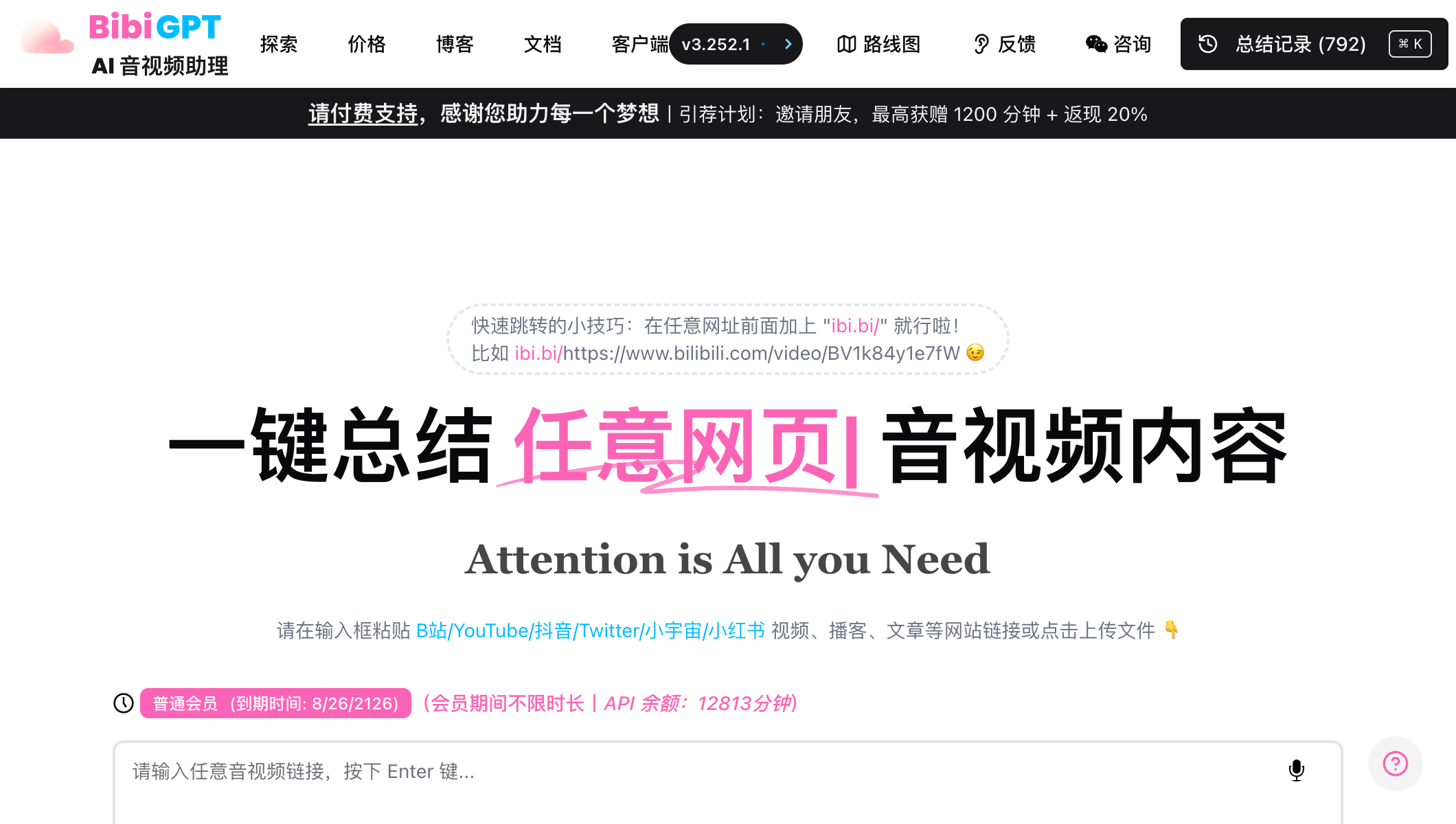 BibiGPT.co - All-in-one AI assistant
Key strengths and standout features BibiGPT.co is the #1 AI audio-video assistant, serving 1M+ users with 5M+ summaries generated. It is a powerhouse media assistant built for both global and Chinese platforms, and that versatility sets it apart. Beyond one-click YouTube summaries, it goes deep on Bilibili, TikTok/Douyin, Xiaohongshu, and even handles local media files — supporting 30+ platforms with a single tool.
The biggest 2026 highlight is bibigpt-skill: install with one command, and AI agents like Claude Code and OpenClaw can directly call BibiGPT's video summary capabilities, enabling fully automated workflows like “auto-summarize new channel uploads daily and send a digest to Slack.”
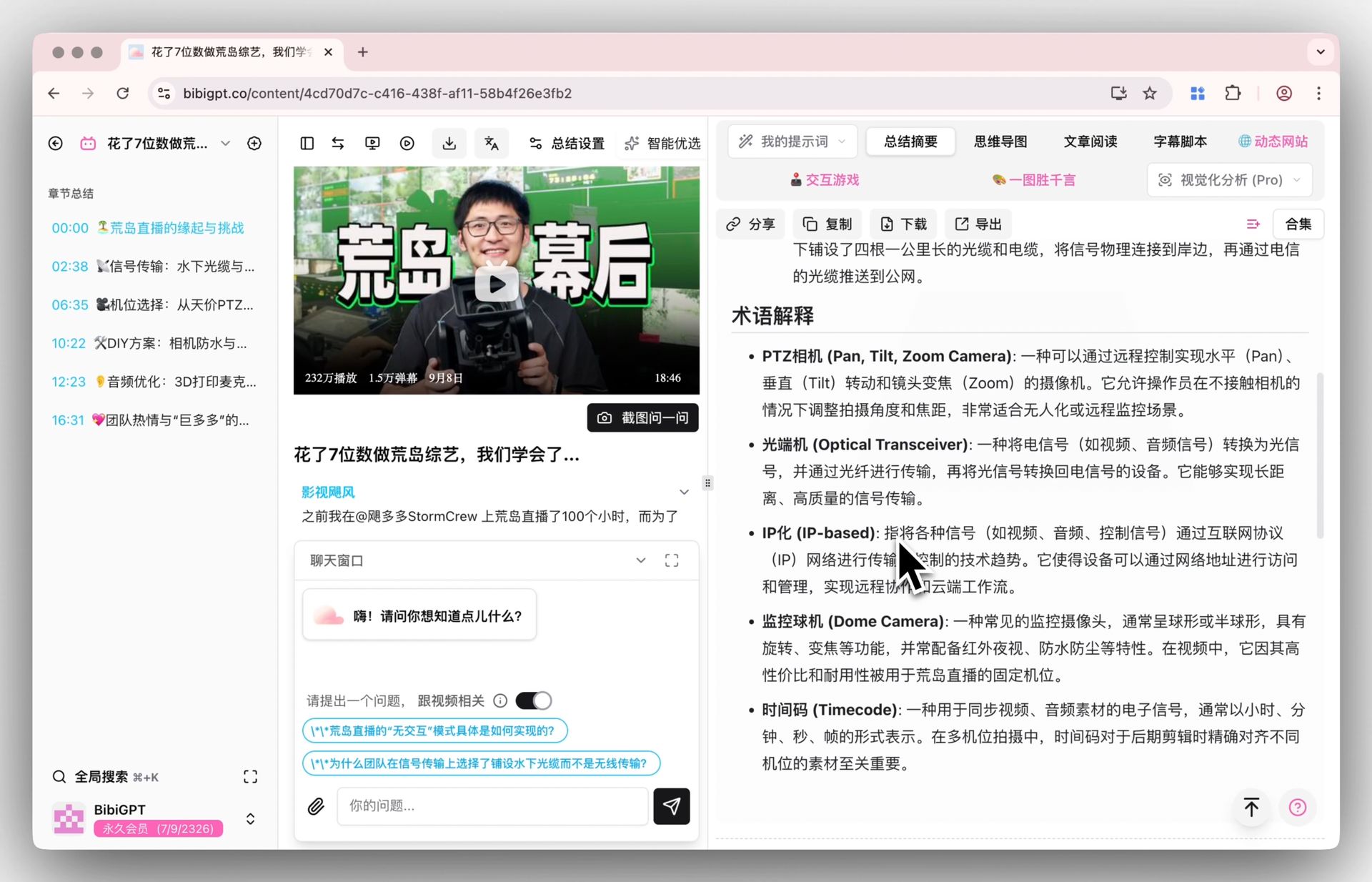 BibiGPT Smart Deep Summary
Seven core capabilities in detail:
- AI video summaries: Instantly distill insights from videos, podcasts, and articles across 30+ platforms. Supports multi-model switching to auto-select the best summarization strategy for each content type.
- Mind map generation: Transform linear videos into non-linear knowledge structures with expandable/collapsible nodes, exportable as images or PDF — a powerful tool for deep learning and knowledge archiving.
- AI video Q&A with source tracing: Ask questions about video content, and every answer comes with clickable timestamps for full traceability. For example, after watching a 2-hour tech lecture, just ask “What was the specific performance optimization approach in Part 3?” and get an instant, pinpointed response.
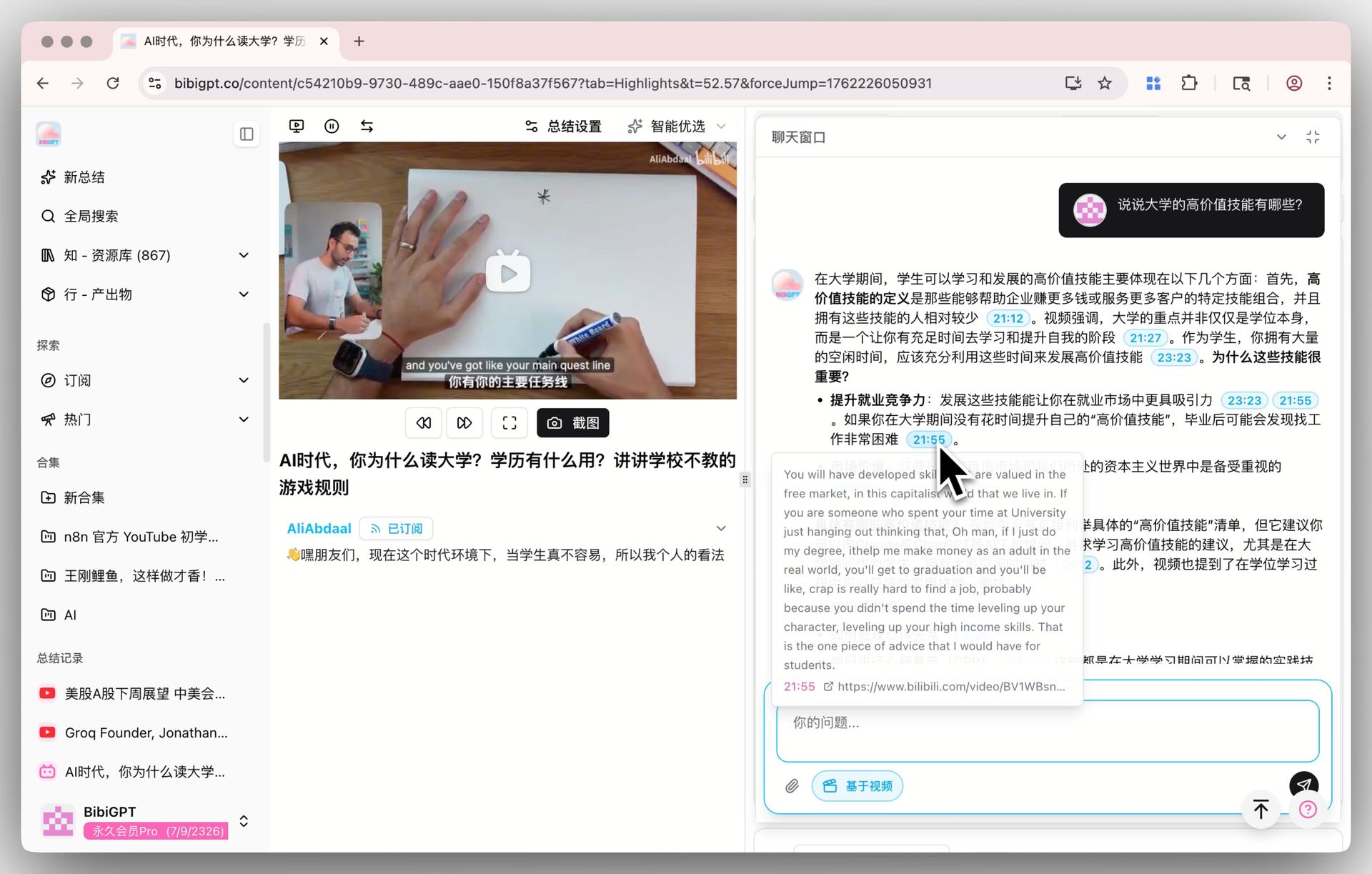 BibiGPT AI Video Dialog with Source Tracing
- Subtitle extraction and AI rewriting: Export full transcripts and intelligently rewrite them into articles, notes, or scripts. Content creators can rapidly transform video content into blog posts, social media content, or newsletters.
- AI highlight notes: Auto-extract timestamped highlights, categorize by topic, one-click export to Markdown/PDF. Works seamlessly with Notion/Obsidian for a complete note-taking workflow. See all AI YouTube tools in one place.
- 2026 AI Agent integration: Via the bibigpt-skill for OpenClaw and Claude Code, BibiGPT can be called from any AI agent workflow with a single shell command.
- API and customization: Open API with custom prompts to adjust output language, detail level, and style — ideal for enterprise batch processing.
See BibiGPT's AI Summary in Action
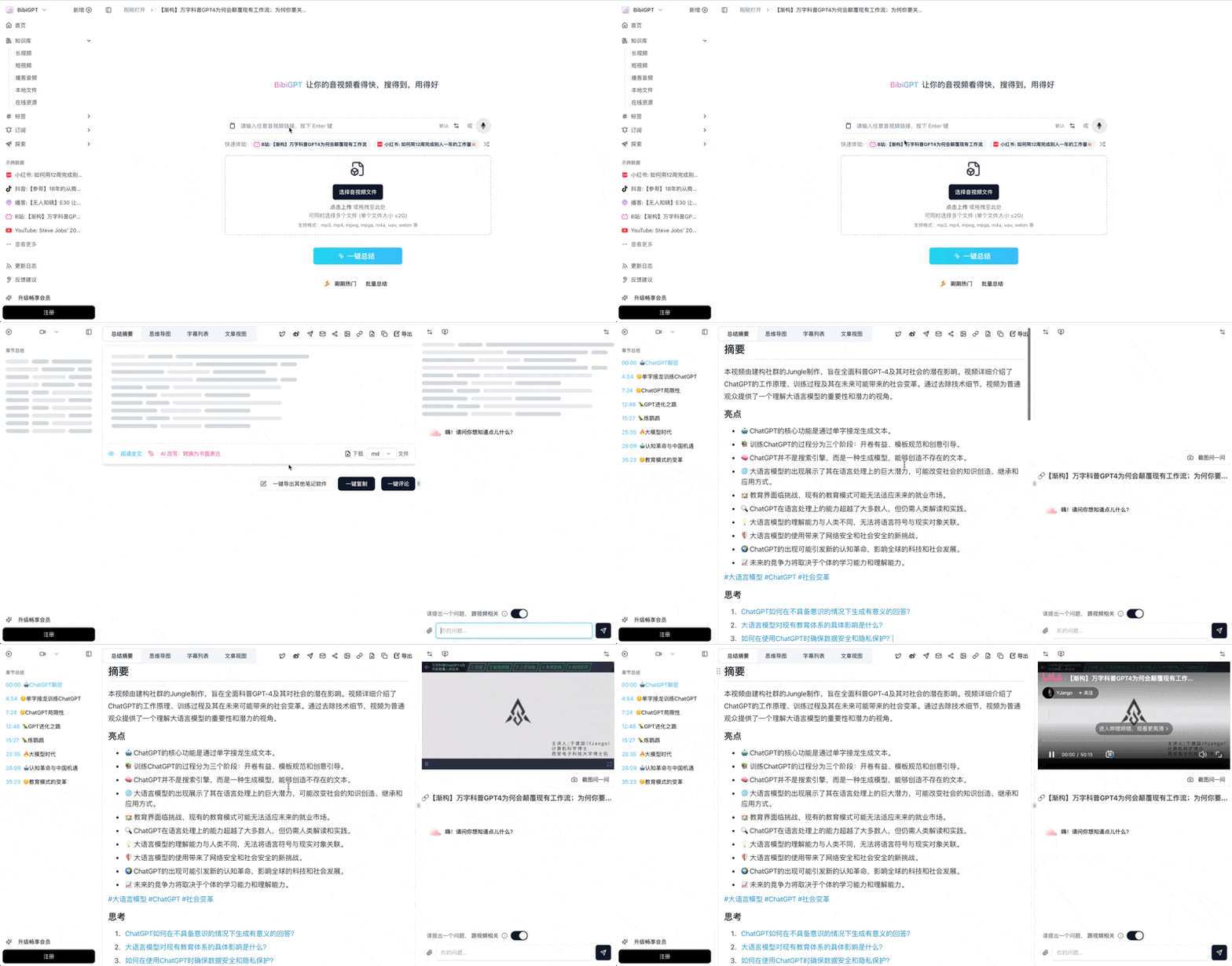
Bilibili: GPT-4 & Workflow Revolution
A deep-dive explainer on how GPT-4 transforms work, covering model internals, training stages, and the societal shift ahead.
Want to summarize your own videos?
BibiGPT supports YouTube, Bilibili, TikTok and 30+ platforms with one-click AI summaries
Try BibiGPT FreeExtended ecosystem The platform ships with browser extensions, desktop apps (macOS/Windows), and mobile apps (iOS/Android), covering virtually every scenario. The latest Chrome extension supports immersive highlights, AI dialogues, and generative layouts right inside the page.
AI agents for collections The new Collection AI dialogue handles entire playlists, letting you ask cross-video questions, compare viewpoints, and build curated knowledge bases.
Pricing BibiGPT offers a generous free plan with daily quotas. Paid tiers unlock higher usage limits, bulk exports, customized mind maps, and team collaboration.
Pros:
- The only tool in 2026 with native Claude Code / OpenClaw AI Agent integration.
- Exclusive deep support for major Chinese platforms (Bilibili/Xiaohongshu/TikTok API authentication handling).
- Local audio/video file support for virtually unlimited use cases.
- Mind maps + AI Q&A + highlight notes + subtitle extraction + AI rewriting form a complete knowledge loop from “watching” to “using.”
- Multi-model switching — auto-selects the optimal AI model per content type for more consistent summary quality.
Cons:
- bibigpt-skill requires installing the BibiGPT desktop app, adding a setup step.
Best fit Learners, researchers, content creators, and developers building automated knowledge workflows across global and Chinese video ecosystems.
New: Automate YouTube Summaries with OpenClaw + bibigpt-skill
The biggest shift in 2026 isn't a better summary—it's automation. With OpenClaw's bibigpt-skill, any AI agent (Claude Code, OpenClaw, your own cron job) can summarize YouTube videos with one command:
bibi summarize “https://youtube.com/watch?v=xxx”
Why this matters: OpenClaw's native summarize only covers YouTube. The bibigpt-skill integration extends this to Bilibili, Xiaohongshu, Douyin, podcasts, and local files—covering the entire video ecosystem, including Chinese platforms that no other AI agent skill supports.
Real automation scenarios:
- Subscribe to 5 YouTube channels → OpenClaw auto-summarizes every new upload at 6 AM and sends you a digest
- Research sprint: batch-summarize 20 videos into a structured Markdown report in one command
- Team knowledge base: auto-archive video summaries to Notion on a schedule, zero manual work
Setup in 5 minutes:
- Install BibiGPT desktop app (macOS/Windows)
- Run
npx skills add JimmyLv/bibigpt-skill - In Claude Code or OpenClaw:
”Summarize this YouTube video for me: <url>”
→ Full setup guide: OpenClaw + bibigpt-skill YouTube research workflow
2. NoteGPT: Interactive Learning for Proactive Users
Why it stands out
NoteGPT turns video summaries into interactive study sessions. Its card-based interface lets you highlight, annotate, and build linked notes that mirror spaced-repetition habits.
Notable capabilities
- AI highlights, key quotes, and timestamps for quick review
- Structured note cards combining Q&A, summaries, and follow-up prompts
- Integrations with Obsidian, Notion, and Readwise syncs
- Browser extensions that work on YouTube, Bilibili, Coursera, and more
Pricing
Free plan available; Pro tiers add unlimited highlights, export formats, and collaborative workspaces.
Best fit
Students and knowledge workers who practice active recall and want summaries that plug into connected note-taking workflows.
3. Glasp: Knowledge Management with a Community Touch
Why it stands out
Glasp blends personal knowledge management with community discovery. You can highlight transcripts, write reflections, and browse how others interpreted the same video.
Notable capabilities
- Highlight and annotate directly on YouTube transcripts
- Auto-sync notes to Obsidian, Notion, and Readwise
- Community feed for shared insights and curated lists
- Chrome extension with AI-generated summaries and quotes
Pricing
The base experience is free; premium tiers unlock advanced export and team features.
Best fit
Lifelong learners who value collective intelligence and want to turn YouTube into a social learning platform.
4. Recall.ai: Build a Personal Knowledge Base
Why it stands out
Recall.ai focuses on meeting recordings and professional development. It aggregates content from Zoom, Google Meet, and YouTube, consolidating everything into a searchable memory.
Notable capabilities
- Automatic meeting import, transcript cleanup, and key takeaway summaries
- AI-powered tagging and topic clustering for fast retrieval
- Workspace sharing for teams to collaborate on the same knowledge base
- API access for developers who want to build custom workflows
Pricing
Professional plans start with generous storage and collaboration features; enterprise pricing is available on request.
Best fit
Remote teams and consultants who need reliable knowledge retention across meetings, webinars, and educational videos.
5. HARPA AI: A Swiss Army Knife Inside Your Browser
Why it stands out
HARPA AI is a browser automation assistant that brings AI directly into web workflows. It can summarize YouTube videos, automate repetitive tasks, and even run custom prompts on any webpage.
Notable capabilities
- On-page chat assistant that references the current video or article
- Batch workflows for summarizing playlists or generating reports
- Support for local large language models, enabling offline and private processing
- Custom prompt builder and trigger-based automation
Pricing
Free tier with daily limits; paid plans unlock higher usage and advanced automation.
Best fit Power users who want AI to live inside their browser tabs, especially those who care about privacy and local processing.
Try pasting your video link
Supports YouTube, Bilibili, TikTok, Xiaohongshu and 30+ platforms
6. YouTube Summarized: Quick Highlights in Seconds
Why it stands out
This lightweight tool focuses on speed. Paste a URL and it delivers a concise textual rundown without extra frills.
Notable capabilities
- Instant summaries for YouTube videos of any length
- Timestamped bullet points to jump to sections fast
- Email digests for subscribed channels
- Minimal interface with zero learning curve
Pricing
Freemium with optional donations; bulk usage requires a paid plan.
Best fit
Casual viewers who just want the highlights—fast.
7. Summarize.tech: Minimalist Summaries That Get to the Point
Why it stands out
Summarize.tech keeps things clean: no sign-ups, no extra workflows. Enter a URL and receive a structured summary divided by chapters.
Notable capabilities
- Auto-generated sections with two-sentence summaries
- Support for live streams and longer content
- Export as plain text or Markdown
- Accessible design with dark mode
Pricing
Free with usage limits; premium credits available for heavy users.
Best fit
Learners who appreciate tidy, well-structured notes without distractions.
8. YouTubeDigest: ChatGPT-Powered Video Briefings
Why it stands out
YouTubeDigest leans into large language models to produce narrative-style briefings. It can generate TL;DR summaries, detailed outlines, and even quiz questions.
Notable capabilities
- Multiple summary modes (concise, detailed, bullet, question-based)
- Export to Notion and Google Docs
- Chrome extension for one-click summaries while browsing
- Cross-platform support for Vimeo, Udemy, and more
Pricing
Free plan with daily quotas; premium tiers unlock unlimited exports and higher LLM usage.
Best fit Educators and teams who want flexible formats for instruction, reports, or newsletters.
Want to see AI summaries in action? Try pasting a video URL into BibiGPT and compare multi-model AI summarization results.
See BibiGPT's AI Summary in Action
Bilibili: GPT-4 & Workflow Revolution
A deep-dive explainer on how GPT-4 transforms work, covering model internals, training stages, and the societal shift ahead.
Want to summarize your own videos?
BibiGPT supports YouTube, Bilibili, TikTok and 30+ platforms with one-click AI summaries
Try BibiGPT Free9. Eightify: Instant Summaries with Timestamp Navigation
Why it stands out
Eightify specializes in turning long-form videos into timestamped insights. Its mobile-friendly design makes it easy to skim on the go.
Notable capabilities
- AI-generated key takeaways anchored to timestamps
- Mobile apps for iOS and Android
- Collaboration spaces for teams to share highlight reels
- Personalized feed recommending summaries based on viewing habits
Pricing
Free for daily summaries; Premium unlocks unlimited access and export options.
Best fit
Busy professionals who rely on mobile devices and need to jump straight to relevant segments.
10. Docsbot.ai: Free Summaries with Zero Sign-Up
Why it stands out
Docsbot.ai keeps things frictionless—no account required. Paste a YouTube link and receive a neatly formatted summary almost instantly.
Notable capabilities
- No-login summaries with Markdown output
- Support for PDFs, web pages, and documents in addition to video
- Embed widgets to add AI Q&A to your own site
- Multi-language support out of the box
Pricing
Core features are free; paid plans add higher limits, whitelabel embeds, and team features.
Best fit
Anyone who wants a zero-commitment way to capture the gist of a video.
2026 Newcomers: TubeOnAI & BiliNote
Two tools emerged rapidly in early 2026:
TubeOnAI: No-Subtitle Video Processing
TubeOnAI crossed 100K users in early 2026. Its killer feature is processing videos without subtitles — generating summaries directly from audio analysis. Offers 130+ summary templates across academic, business, and entertainment categories. Priced at $9.99/month.
- Pros: No-subtitle processing; rich templates; clean UI
- Cons: No Chinese platform support; lacks mind maps and AI chat; minimal free tier
BiliNote: Open-Source Video Notes
BiliNote is an open-source AI video note tool supporting Bilibili and YouTube, auto-generating structured Markdown notes. Popular in the developer community.
- Pros: Completely free and open-source; Bilibili support; Markdown output
- Cons: Self-hosted; basic features (no mind maps/flashcards/AI chat); stability varies
Bottom line: For a professional multi-platform solution, BibiGPT still leads in completeness — 30+ platforms + AI podcast summary + mind maps + flashcards. TubeOnAI's no-subtitle processing is impressive but niche, and BiliNote suits DIY builders.
What’s Next: The Frontiers of AI Video Summaries
AI video summarization is evolving from passive "paste a link, get a summary" tools into proactive AI agents that auto-subscribe to channels, summarize new uploads daily, and deliver curated briefings — fundamentally changing how knowledge workers consume information.
The next wave of summarization tech will be shaped by four breakthroughs:
- Multimodal understanding: Summaries will parse visuals, slides, and on-screen text—going beyond audio transcripts.
- Context-aware reasoning: Future tools will interpret speaker intent, tone, and scene context for richer insights.
- Deep personalization: AI will learn your background and goals, tailoring the depth of explanations accordingly.
- Proactive agents: Instead of waiting for prompts, agents will monitor channels you follow, curate the best content, summarize it, and deliver daily or weekly briefings.
FAQs
YouTube AI video summary tools work by extracting transcripts via speech recognition, then using advanced AI models to analyze content structure and generate concise summaries — top tools also offer mind maps, AI follow-up Q&A, and note export features.
Q: How do YouTube video summary tools work?
A: They usually analyze transcripts or audio tracks, then apply natural language processing and large language models to identify key ideas, condense them, and output text or visuals.
Q: How accurate are the summaries?
A: Most leading tools leverage state-of-the-art AI for high accuracy. Still, background noise, complex topics, or domain-specific jargon can affect performance. Cross-check critical information with the original video when needed.
Q: Can these tools summarize non-YouTube videos?
A: Yes. Advanced platforms like BibiGPT.co support Bilibili, Douyin, Xiaohongshu, and local files. NoteGPT covers Bilibili and offline uploads as well. Always verify the supported platforms before you choose a tool.
Q: How do these tools handle privacy and data security?
A: Policies vary. HARPA AI can run on local models, keeping data entirely offline. Cloud services such as BibiGPT.co comply with regulations like GDPR, encrypt data in transit and at rest, and avoid using user data to train models. Zero-login solutions (e.g., Docsbot.ai) minimize personal data collection. Always read the privacy policy before committing.
Q: What sets BibiGPT.co apart?
A: Its strengths lie in broad platform coverage and deep interactivity. It uniquely supports major Chinese platforms and local files, making it invaluable for bilingual users. Beyond text summaries, it offers mind maps, AI dialogues, and advanced sharing tools—turning information into an interactive learning experience. Developers also benefit from its open API.
Q: What if a YouTube video fails to process?
A: No worries. Follow our advanced guide—How to handle “temporarily unsupported” media with BibiGPT. Download the video with a third-party tool, upload it to BibiGPT, and you’re back on track.
Get Started with BibiGPT.co Today
In the age of information overload, efficient knowledge capture is critical. With multi-platform coverage, deep support for Chinese media, and inventive features like mind maps and AI dialogues, BibiGPT.co delivers tremendous value.
It is more than a YouTube summarizer—it is your AI assistant for audio and video across Bilibili, Douyin, Xiaohongshu, and local files.
Stop letting information overload stall your progress. Experience the speed and convenience of BibiGPT.co today.
Start your AI efficient learning journey now:
- 🌐 Official Website: https://aitodo.co
- 📱 Mobile Download: https://aitodo.co/app
- 💻 Desktop Download: https://aitodo.co/download/desktop
- ✨ Learn More Features: https://aitodo.co/features
For more guides and comparisons, explore:
- Best AI Podcast Summarizer Tools 2026
- Best AI Meeting Transcription Tools 2026
- NotebookLM Cinematic Video vs BibiGPT
- Top 5 Bilibili AI Video Summary Tools in 2026
Wrapping Up
In 2026, AI video summary tools have evolved from passive utilities into proactive AI agents. From quick overviews to automated daily digests that summarize YouTube channels while you sleep, the market now spans every workflow.
Choose the tool that matches your needs: a one-click summarizer for occasional use, or an agent-powered pipeline (like OpenClaw + bibigpt-skill) for continuous, automated knowledge capture. The best AI doesn't just answer—it watches, summarizes, and delivers insights before you even ask.